Amenity Procurement
Apartment and condo sauna amenity procurement guide
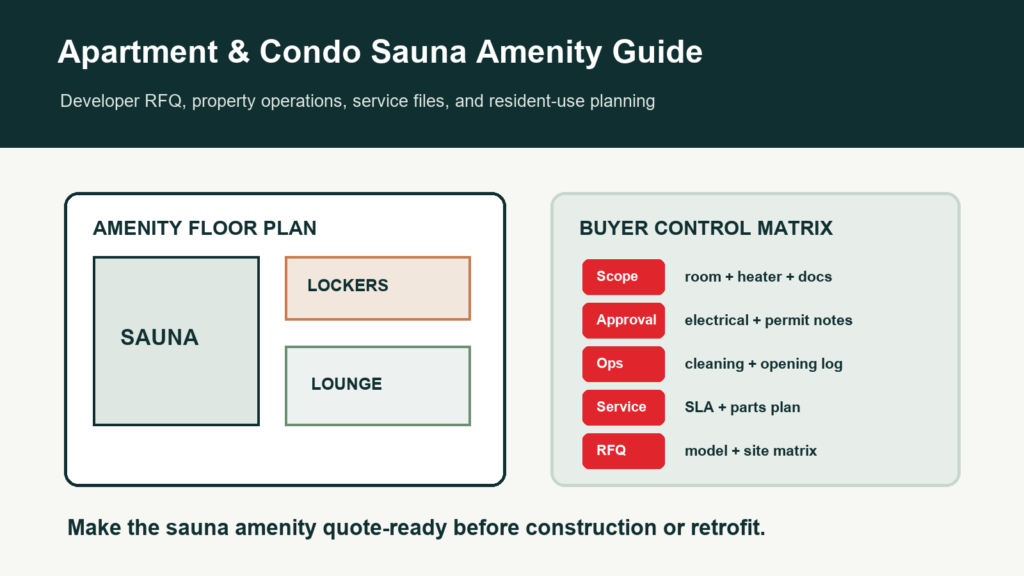
A sauna amenity for an apartment or condo building should be planned as a long-term facility, not a one-time product purchase. The buyer needs model fit, operating rules, maintenance access, safety records, and a clear handover file.
Amenity projects need operating clarity.
Apartment and condo sauna rooms are shared by many users, often with limited staff oversight. The specification should cover capacity, door control, heater recovery, cleaning, signage, and service access before the order is confirmed.
Use this guide to align property managers, developers, importers, installers, and factory teams around one procurement file.
1. Amenity model selection
The room should fit the building use pattern and maintenance team.
| Decision | What to check | Why it matters | Output |
|---|---|---|---|
| Use frequency | Resident peak hours and expected daily use | Controls durability and heater recovery | Operating assumption |
| Room type | Indoor room, outdoor cabin, cube, or commercial layout | Controls site, ventilation, and finish | Model shortlist |
| Capacity | Number of users and bench layout | Avoids oversizing or crowding | Approved layout |
| Access route | Delivery path, elevator, corridor, site opening | Prevents installation issues | Site readiness note |
| Maintenance access | Heater, lighting, bench, ventilation access | Reduces downtime | Service plan |
| Resident rules | Signage, operating hours, guest guidance | Protects user experience | Operator file |
2. Specification checklist
The specification should describe the room as the operator will maintain it.
| Area | Specification field | Buyer question | Factory confirmation |
|---|---|---|---|
| Wood | Species, finish, cleaning limits | What material fits shared use? | Material note and certificate where needed |
| Door and glass | Opening, handle, seal, glass layout | Can residents use it safely? | Door schedule |
| Heater | Voltage, kW, controller, guard, sensor | Does heat recover after repeated use? | Heater specification |
| Ventilation | Air inlet and outlet | Will the room feel stable? | Vent layout |
| Lighting | Lamp or LED, service access, voltage | Can maintenance replace parts? | Lighting note |
| Accessories | Signs, thermometer, timer, cleaning notes | What is included at handover? | Accessory list |
3. Property handover
The handover should make the room manageable for the property team.
| Handover item | What it includes | Who uses it | Risk if missing |
|---|---|---|---|
| Opening checklist | Door, bench, heater area, floor, ventilation | Building staff | Unsafe daily operation |
| Cleaning log | Method, staff owner, visible condition | Maintenance team | Wood damage |
| Issue reporting | Photo, model, symptom, date, owner | Property manager | Slow support |
| Spare-parts file | Door, seal, lighting, hardware, heater notes | Dealer and warehouse | Downtime |
| Signage | Resident rules and safety reminders | Residents and staff | Misuse |
| Annual review | Wear, maintenance cost, replacement needs | Property owner | Unplanned budget |
4. Supplier comparison
Compare suppliers by facility readiness, not only by room price.
| Score area | Strong supplier answer | Weak supplier answer | Decision signal |
|---|---|---|---|
| Model fit | Explains amenity use and maintenance | Generic sauna category | Better long-term fit |
| Documents | Manuals, labels, certificates, packing evidence | Documents later | Lower project risk |
| Electrical | Voltage, power, controller, local installer note | Heater included | Technical clarity |
| Maintenance | Cleaning, spare parts, service path | No operator file | Lower operating risk |
| Packing | Cartons, labels, delivery sequence | Only CBM | Cleaner receiving |
| After-sales | Evidence-based support process | Contact us only | Better support |
Buyer file fields to keep visible
A good procurement or compliance article should become a buyer file. Keep the approved fields visible so sales, design, warehouse, installer, and service teams can use the same facts.
| Field | Why it matters | Who uses it | When to update |
|---|---|---|---|
| Model code | Connects the discussion to a real sauna room | Buyer, dealer, factory sales | When the selected model changes |
| Approved drawing | Confirms size, door, glass, bench, heater, and ventilation | Designer, installer, project owner | Whenever layout changes |
| Material record | Names wood, roof, exterior finish, glass, and hardware | Buyer and design team | Before visible material is cut |
| Electrical note | Records voltage, phase, heater power, controller, and market assumptions | Importer and electrician | Before heater package is locked |
| Packing file | Shows cartons, labels, manuals, spare parts, and accessory scope | Warehouse and buyer | Before shipment |
| Service file | Keeps photos, issue notes, replacement decisions, and owners | Dealer and after-sales team | At handover and after service |
Decision owners
Many project delays happen because no one owns an open field. Name the owner for each decision so the file moves instead of becoming a chain of messages.
| Decision | Factory confirms | Buyer or local team confirms | Output |
|---|---|---|---|
| Room family | Feasible model and customization range | Use case, budget, site size | Model shortlist |
| Material | Wood options, finish availability, certificate support | Visual preference, climate, premium requirement | Material approval |
| Electrical | Heater package and controller options | Local voltage, installer, compliance expectation | Electrical note |
| Documents | Available certificates, manuals, packing evidence | Import, project, or tender requirement | Document list |
| Packing | Carton count, labels, loading photos | Receiving site and warehouse process | Packing file |
| Service | Compatible parts and evidence needed | Local support process and owner | After-sales file |
Repeat-order review
After the first order, use the file to improve the next order. The review should identify which fields were unclear, which documents were late, and which support questions repeated.
| Timing | Review question | Evidence | Next action |
|---|---|---|---|
| Before production | Were all material, electrical, and drawing fields confirmed? | Approved option sheet | Lock or revise |
| Before shipment | Were labels, manuals, accessories, and spare parts clear? | Packing list and photos | Approve shipment |
| After arrival | Were cartons easy to identify and undamaged? | Receiving photos | Improve labels or packing |
| After installation | Were site, heater, and handover notes sufficient? | Installed photos and issue notes | Update installer file |
| After first month | What questions did staff, dealers, or users ask? | Service log | Update training |
| Before reorder | Which model, option, or document should change? | Sales and service records | Revise next order file |
Amenity procurement priorities
- Use frequency
- Maintenance access
- Clear signage
- Cleaning log
- Spare-parts path
Avoid these gaps
- No operator owner
- No electrical note
- No cleaning rules
- No site access check
- No handover file
Model references used in this guide
Use real model pages as the starting point, such as CSA-05 commercial cedar sauna room, CSA-06 red cedar outdoor sauna kit for hotels, and CSA-08 black hemlock square sauna.
Factory note
Apartment and condo projects need the same discipline as commercial rooms because the buyer must manage shared users, operating records, and service support after installation.
Working note for buyer teams
The first version of this file should mark open fields clearly. If the voltage, document requirement, material certificate, packing label, accessory scope, or service owner is not confirmed yet, write that into the file. Open fields are manageable; hidden assumptions become cost, delay, or trust problems.
For repeat orders, keep the same structure and update only the facts. That gives the buyer and factory a stable language for model, material, electrical, compliance, packing, installation, and after-sales decisions.
Responsibility boundaries to confirm
Before the file is shared with a project buyer or distributor, name which party owns each open decision. The factory can confirm product structure, available materials, heater package options, packing evidence, and compatible parts. The importer, project owner, or dealer usually owns the local site, code review, installer coordination, operating rules, and final customer communication. If those boundaries are not written down, a technical question can turn into a commercial dispute.
For higher-value projects, add an owner column to the working sheet. The owner can be a person, department, or outside contractor, but it should be visible. This keeps the file moving because everyone can see who must answer before the model, document, electrical, packing, or handover step is considered complete.
When a field is still undecided, keep it visible until it is closed. Typical open fields include final voltage, local installer review, label language, material certificate request, private-label artwork, carton mark, spare-parts scope, and handover owner. Closing these fields early makes production, shipment, and service much cleaner.
Record the decision date and owner beside each closed item before rollout.
Editable buyer workbook
Amenity procurement workbook fields
Apartment, condo, and hospitality sauna projects usually fail when the model file, site file, and operator file are separated. A practical procurement workbook should keep buyer use, building constraints, service access, and handover evidence together.
| Field group | What to record | Why it matters |
|---|---|---|
| Property profile | Apartment, condo, hotel, spa, or mixed-use project; expected users per day; peak hours; indoor or outdoor location; and target opening date. | Shows whether the sauna is being specified for light amenity use or heavy commercial duty. |
| Room fit | Model code, exterior size, capacity, bench layout, glass direction, door swing, ceiling height, and delivery access limit. | Keeps the selected model tied to the actual building route and room envelope. |
| Material decision | Wood species, exterior finish, roof direction, floor/base note, glass color, hardware color, and cleaning exposure. | Helps property teams choose materials that match operation and maintenance reality. |
| Utility route | Voltage market, heater route, controller location, ventilation path, cable entry, and local electrician responsibility. | Separates factory-supplied parts from local building work. |
| Operator file | Cleaning routine, signage, spare parts, service access side, warranty contact, and maintenance log owner. | Turns the sauna into an operating amenity instead of a one-time purchase. |
| Approval evidence | Drawing revision, material sample photo, heater file, packing list, certificate question, and final approval owner. | Gives procurement a clean record before deposit or production release. |
For a complete editable amenity workbook, ask for the procurement sheet and include property type, target users, room location, and voltage market.
Need an editable amenity procurement sheet?
Send the building type, use frequency, and target room family. We can prepare an editable procurement checklist for property and project teams.