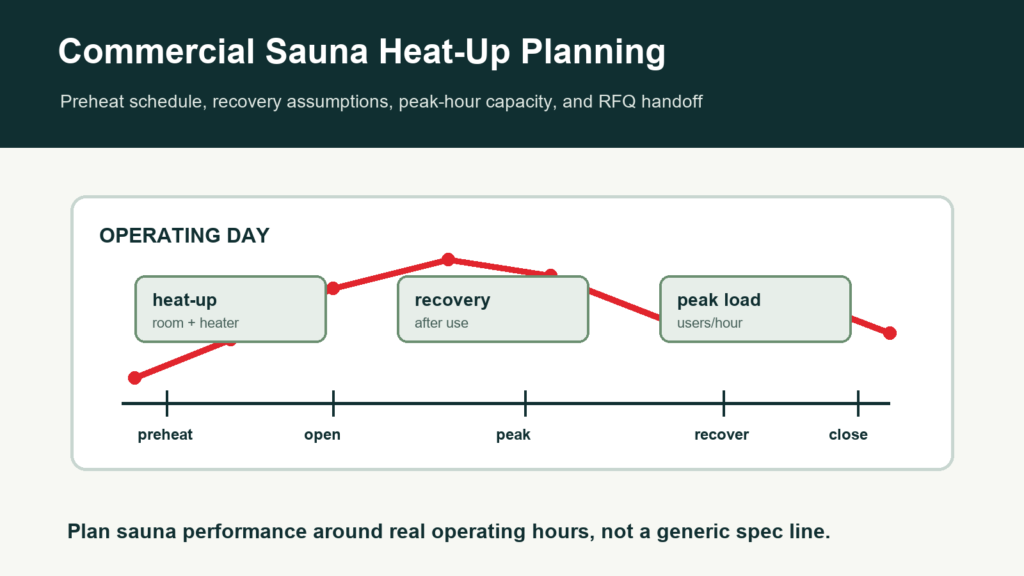
Commercial sauna heat-up planning is an operating decision, not just a heater number. A gym, hotel, apartment, spa, or wellness club needs to know when the sauna opens, how busy peak periods are, how long the room must recover between waves of users, and who owns the preheat schedule.
This guide helps procurement teams, facility managers, architects, contractors, and distributors prepare a heat-up, preheat, and peak-hour handoff for CSauna. Exact performance depends on final room design, heater selection, controls, local installation, ventilation context, starting temperature, and user behavior.
Operations planning worksheet
Complete heat-up and peak-hour planning worksheet fields
Commercial buyers need to know how a sauna behaves during opening, peak use, recovery, and shutdown. CSauna uses this worksheet to connect the product model, heater package, control plan, and staff routine before a facility commits to a specification.
| Worksheet area | Fields to collect | How the facility uses it |
|---|---|---|
| Operating profile | Facility type, opening hours, peak windows, expected users per hour, target temperature, preheat requirement, and whether the room serves guests, members, residents, or staff. | Defines whether the sauna is occasional-use, daily-use, or high-traffic commercial equipment. |
| Room and heater basis | Room volume, insulation, glass area, bench load, heater kW, voltage/phase, controller type, sensor location, and ventilation note. | Links performance expectations to the actual room and heater package instead of a generic capacity claim. |
| Peak-hour control | Warm-up schedule, setpoint range, door-open risk, towel or water-use rules, cleaning breaks, emergency stop location, and staff override process. | Turns technical sizing into an operating routine the facility team can manage. |
| Energy and cost review | Local electricity rate, estimated runtime, standby plan, occupancy pattern, maintenance interval, and whether the room is part of a multi-location rollout. | Lets procurement compare operating cost, not only product price. |
| Commissioning record | Start temperature, time to target, recovery after use, controller photos, heater label photo, owner sign-off, and unresolved punch-list item. | Creates a baseline record for warranty, maintenance, and future replacement planning. |
For the editable heat-up and peak-hour worksheet, send CSauna the room size, target use schedule, heater preference, voltage question, and facility type. No quote request is required for the worksheet.
Why Heat-Up and Peak-Hour Planning Belongs in the Project File
| Buyer Question | Why It Matters | Related Resource |
|---|---|---|
| When should the sauna be ready? | Preheat timing affects guest experience, energy assumptions, staffing, and opening procedures. | Energy and OPEX Guide |
| How heavy is peak use? | A high-volume gym sauna may need different recovery assumptions than a hotel spa or apartment amenity. | Gym Sauna Supplier Guide |
| What controls the recovery path? | Room volume, heater path, glass area, ventilation, door behavior, and controls all influence recovery. | Ventilation and HVAC Guide |
| Who owns daily operation? | Facilities, front desk, spa staff, or property managers need clear handover files and operating routines. | Commissioning Punch List |
Heat-Up and Recovery Inputs
- Project type: gym, hotel, spa, apartment, condo, resort, wellness club, showroom, or replacement project.
- Operating hours, opening time, closing time, cleaning windows, and expected preheat responsibility.
- Peak periods, expected users per hour, session turnover pattern, door-open behavior, and quiet periods.
- Room dimensions, ceiling height, bench layout, glass area, door direction, insulation assumptions, and adjacent rooms.
- Heater and control assumptions, including electric heater path, control location, sensor discussion, and local review needs.
- Ventilation and HVAC context, including air path questions, surrounding room conditions, and comfort expectations.
- Destination climate, starting room temperature, seasonal variation, and whether the project is indoor or outdoor.
- Facilities handover file: preheat routine, opening checklist, user rules, cleaning SOP, maintenance schedule, and escalation owner.
Commercial Scenario Matrix
| Scenario | Planning Focus | buyer file Note |
|---|---|---|
| Fitness center or gym | Morning and evening peak demand, repeated door openings, user turnover, and maintenance access. | Ask about peak-hour load and recovery assumptions with the heater/control path. |
| Hotel or resort spa | Guest readiness, treatment schedule, premium experience, staff ownership, and quiet recovery periods. | Connect sauna timing with spa operations and opening-day handover. |
| Apartment or condo amenity | Resident rules, predictable operating windows, property manager routines, and budget control. | Define whether the room operates by schedule, booking, or facility hours. |
| Retrofit project | Existing room evidence, old heater history, downtime, repeated complaints, and replacement goal. | Send service history and current heat-up complaints when requesting the quote. |
| Showroom or dealer display | Demonstration readiness, sales appointment windows, safe operation, and staff training. | Match preheat routine with showroom traffic and staff ownership. |
Peak-Hour Buyer Checklist
- Define the operating day: opening time, closing time, cleaning windows, and whether the room is always-on or scheduled.
- Estimate peak load: expected users per hour, session style, door-open frequency, and busiest periods.
- Connect room and heater: room volume, glass area, bench layout, heater path, controls, and local approval questions.
- Check recovery assumptions: ask how the room should be reviewed for recovery after repeated use, not just initial heat-up.
- Plan handover: create preheat, opening, closing, cleaning, and maintenance routines for the facility team.
- Review OPEX: connect preheat schedule and peak-hour behavior with the monthly operating-cost assumption.
Common Mistakes
| Mistake | Project Impact | Better Handoff |
|---|---|---|
| Asking for one generic heat-up time | The answer ignores room design, user behavior, controls, ventilation, and site conditions. | Send the full operating profile and room file. |
| Ignoring peak-hour recovery | The sauna may feel weaker during real busy periods even if initial heat-up seems acceptable. | Define users per hour and door-open behavior. |
| No owner for preheat routine | Guest experience becomes inconsistent because staff or property teams do not know who starts the room. | Add preheat responsibility to the handover file. |
| Energy budget is separate from operations | OPEX assumptions may not match actual schedule or user volume. | Connect energy planning with operating hours and peak load. |
| HVAC questions come too late | Room comfort and recovery questions can become contractor issues after procurement. | Coordinate ventilation before supplier discussion lock. |
How We Use This Handoff
We use the heat-up and peak-hour handoff to understand room intent, expected use, heater/control discussion, documentation needs, and commercial operating requirements. This improves quote clarity for buyers while keeping final site performance, code review, local installation, and facility operation with the buyer’s qualified project team.
Read this guide with the Electric Sauna Heater and Control Planning Guide, Sauna Room Design Brief, Commercial Sauna Project Submittal Checklist, and CSauna contact page.
Commercial Sauna Heat-Up FAQ
How long does a commercial sauna take to heat up?
There is no single reliable heat-up time for every commercial sauna. Room volume, heater selection, insulation, glass area, ventilation context, starting temperature, target temperature, and operating schedule all affect the result.
What should a buyer include in a sauna preheat buyer file?
Include room dimensions, target use, operating hours, expected peak periods, heater and control assumptions, destination climate, ventilation questions, glass area, and facility manager handover needs.
Why does peak-hour planning matter for gyms and hotels?
Peak-hour planning helps buyers check whether the room, heater, preheat schedule, cleaning window, recovery assumptions, and service ownership match real user demand instead of only a static product size.
Can CSauna guarantee exact recovery time from a buyer file?
We can help discuss product and heater assumptions, but exact recovery time depends on final room design, site conditions, local installation, controls, ventilation context, and operating behavior.
Commercial operations appendix
Commercial peak-hour operating worksheet
Commercial heat-up planning should connect the product model, room size, heater/control plan, opening schedule, and staff handover. This appendix helps facilities teams turn the guide into an operating file.
Peak-hour readiness worksheet
| Operating input | What to record | Why it matters | Who owns it |
|---|---|---|---|
| Opening time | First user access time, staff arrival time, target room readiness time. | Preheat plan must work backward from opening, not from guesswork. | Facility manager or opening staff. |
| User waves | Expected users per hour, peak window, recovery time between groups. | Commercial rooms need recovery planning, not just maximum temperature. | Operations manager. |
| Control access | Who can change temperature, timer, and mode. | Prevents guests or untrained staff from changing settings during peak time. | Facility manager. |
| Maintenance buffer | Cleaning and ventilation period between heavy-use windows. | Keeps performance and comfort stable across the day. | Cleaning or service team. |
Model and site evidence before final heat-up expectations
| Evidence item | Use in planning | Example record | Review note |
|---|---|---|---|
| Model reference | Connects expectation to the selected sauna format. | CSA-05 commercial cedar sauna reference or selected project model. | Do not compare heat-up expectations across unlike room types. |
| Room envelope | Interior volume, glass area, insulation direction, ventilation path. | Drawing, product page, site sketch, or architect handoff. | Large glass or outdoor exposure changes warm-up behavior. |
| Electrical scope | Voltage, phase, breaker, control location, local installer note. | Electrician worksheet or project submittal. | Performance expectations depend on approved installation. |
| Operating record | Temperature log during setup week and peak week. | 10-minute interval log during preheat and recovery. | Use real records before changing heater or schedule. |
How dealers should use this appendix
- For gyms and hotels, the final operating worksheet should be handed to front-desk, cleaning, and maintenance teams.
- Record warm-up expectations by project after installation; factory model references are planning inputs, not final site guarantees.
- If the site has repeated peak-hour complaints, compare operating logs before changing product specifications.
Factory evidence worksheet
Peak-Hour Operating Assumption Sheet
Commercial heat-up planning depends on room size, heater selection, user turnover, and how the facility operates the sauna during busy periods.
| Planning input | What to document | How it affects the sauna plan |
|---|---|---|
| Opening schedule | Daily start time, first user time, and preheat window | Defines the heat-up target before the room is occupied. |
| Peak usage | Expected users per hour, session length, and turnover pattern | Helps size benches, heater capacity, and operating guidance. |
| Starting condition | Indoor/outdoor location, climate, starting room temperature, and insulation assumptions | Changes heat-up time and heater workload. |
| Control handoff | Who operates the sauna: staff, guest, trainer, maintenance, or automated timer | Determines control placement, instructions, and service routine. |
For hotels, gyms, and spas, the most useful heat-up request includes operating hours and peak-time behavior, not only room dimensions.
Product reference table for this resource
Use this table when the article needs to connect back to a real CSauna model page, project screenshot, or buyer evidence file. It keeps the resource useful without turning it into a sales block.
| Reference field | What to record | Evidence to attach | How the buyer uses it |
|---|---|---|---|
| CSauna product catalog | Shortlist one or more model pages that match the Commercial Sauna Heat-Up and Peak-Hour Planning Guide discussion. | Product URL, model code, screenshot, and buyer note. | Keeps the resource tied to real models rather than generic advice. |
| Model comparison note | Record capacity, heater route, glass, wood, packing, site fit, and service needs. | Marked screenshot, product photo, label photo, or worksheet row. | Helps the buyer compare options with the same fields. |
| Closeout record | Record the selected model reference, open question, owner, and next review date. | Worksheet, email note, photo folder, or internal project file. | Makes the article usable for handover, not just reading. |
Operating test appendix
Peak-hour test record for commercial sauna operations
Commercial heat-up expectations should be checked against the actual site schedule, room traffic, staff routine, and model assumptions. This record helps gyms, hotels, spas, and facility managers compare the planned operating window with the real start-up and recovery pattern.
Preheat and recovery test log
| Test field | What to record | Why it matters | Decision signal |
|---|---|---|---|
| Room and model identity | CSA model code, room size, heater/control option, site name, and test date. | Keeps the test tied to a real sauna package, not a generic heat-up claim. | If model or heater scope changes, repeat the test. |
| Starting condition | Starting room temperature, door position, recent cleaning, ventilation state, and outside/site condition. | A cold, wet, or recently cleaned room changes the first heat-up reading. | Poor starting condition should not be blamed on the model alone. |
| Time-to-ready checkpoints | Temperature or readiness note at 15, 30, 45, 60, and 90 minutes, plus staff action taken. | Shows whether the schedule can support opening, member peak, or treatment start time. | If ready time misses the operating window, adjust preheat schedule or review technical assumptions. |
| Recovery after use | Door openings, user load, towel/water behavior, and time needed to return to target comfort. | Commercial sites often fail during peak use, not during empty-room warmup. | Repeated recovery misses may require operating changes, staff instruction, or technical review. |
Peak-hour responsibility map
| Responsibility | Buyer/site team owns | Supplier can support | Record to keep |
|---|---|---|---|
| Daily opening routine | Preheat start time, staff checklist, door discipline, cleaning timing. | Recommended fields and model-specific questions. | Opening checklist and actual start time log. |
| Technical assumptions | Local electrical/HVAC review, site installation, controls access, safety responsibility. | Product model, heater/control information, drawings, and documentation scope. | Technical reviewer note and final product file. |
| Operating feedback | Guest/member complaints, recovery observations, staff notes, and repeated peak-hour issues. | Help organize evidence and compare against model/site assumptions. | Monthly operating review with action owner. |
| Change decision | Whether to alter schedule, signage, staff routine, spare parts, or future model selection. | Model comparison and support questions for next purchase. | Decision note before changing the standard package. |
How buyers should use this planning file
- Do not quote heat-up expectations from person count alone; commercial use depends on schedule and recovery.
- Use one repeatable test log for every location so chain buyers can compare sites cleanly.
- Keep staff routine, temperature notes, and model code in the same file before deciding whether the product is undersized.