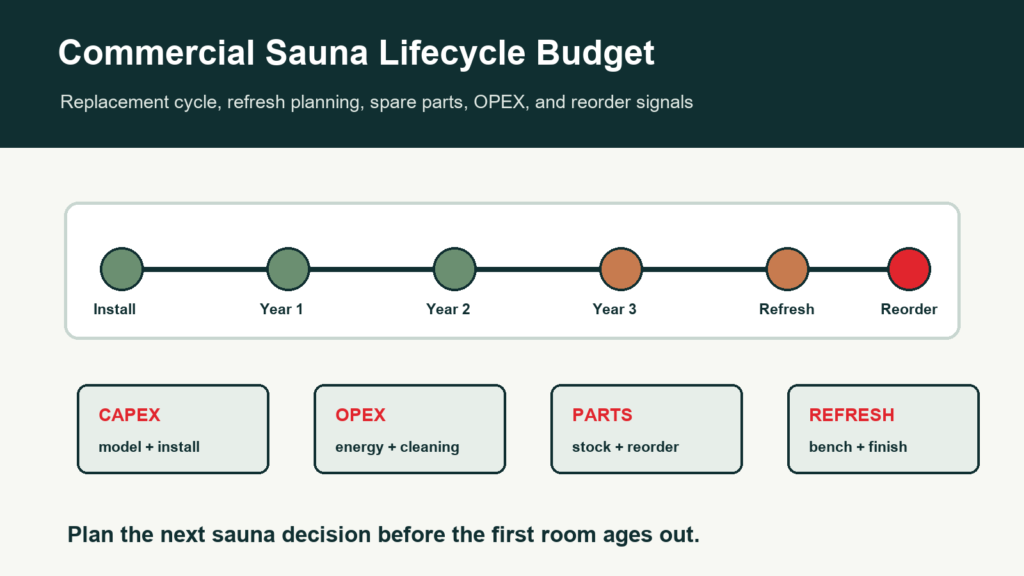
A commercial sauna lifecycle budget connects the first purchase with the next refresh, parts plan, and reorder decision. Hotels, gyms, apartments, spas, and wellness clubs should not wait until a sauna room looks tired or goes down repeatedly before planning the next budget cycle.
This guide helps commercial buyers, facilities managers, property managers, distributors, and project owners build a practical lifecycle file for CSauna sauna projects. It is not accounting advice; depreciation, capex, tax treatment, and budget approval rules should be handled by the buyer’s finance team.
Lifecycle budget worksheet
Complete commercial sauna lifecycle budget worksheet fields
A commercial sauna budget should cover more than the first room price. Hotels, gyms, spas, and wellness projects usually need a view of installation scope, energy use, maintenance, spare parts, refresh timing, and replacement risk across several years.
| Budget area | Fields to record | Planning question it answers |
|---|---|---|
| Initial scope | Facility type, room count, model family, capacity, exterior size, heater power, voltage, wood/finish, glass area, bench layout, ventilation note, and site constraints. | Whether the selected sauna room fits the building, user load, and installation environment. |
| Installed cost | Sauna room, heater/control package, freight, duty review, local delivery, electrical work, ventilation, floor/drain work, installation labor, and commissioning. | How far the buyer’s budget is from the actual ready-to-operate cost. |
| Operating cost | Expected sessions per day, heat-up time, heater kW, electricity rate, cleaning labor, towel/consumable process, maintenance interval, and downtime allowance. | Whether the operating budget is realistic for the site’s usage pattern. |
| Maintenance and spares | Bench service, door seal, hinges, heater stones, controller, sensors, lighting, spare-parts stock, warranty owner, and service response target. | Which parts should be planned before the room becomes a service issue. |
| Refresh or replacement | Inspection date, visible wear, heater age, control condition, wood condition, guest feedback, revenue impact, replacement trigger, and owner decision date. | When renovation is cheaper than repeated repair, and when a new room should be planned. |
For the editable lifecycle budget worksheet, send CSauna the facility type, room count, target model family, country, expected usage, and whether the file is for a new project, renovation, or replacement plan. No quote request is required for the worksheet.
Lifecycle Budget Layers
| Layer | What to Budget | Decision Signal |
|---|---|---|
| Initial CAPEX | Sauna model, heater path, shipping, documents, installation boundary, and opening files. | buyer file approval, project budget, and commissioning readiness. |
| Operating cost | Energy scenario, cleaning labor, inspections, maintenance reviews, and service tickets. | Monthly dashboard, OPEX worksheet, and facilities review. |
| Spare parts | Local stock, regional stock, reorder forecast, replacement part identification, and compatibility. | Repeated tickets, stockout risk, and downtime hours. |
| Refresh scope | Benches, finish items, door hardware, signage, selected accessories, documentation, and guest-facing updates. | Brand standards, user complaints, wear, and renovation calendar. |
| Replacement or upgrade | New model path, heater/control update, layout change, compliance questions, and project timeline. | High downtime, major renovation, changed use pattern, or end-of-life decision. |
Replacement Cycle Triggers
A replacement cycle is not only a date on the calendar. Commercial buyers should review both condition and business use:
- Downtime hours or repeated room closures are increasing.
- Service tickets repeat for the same component, location, or use case.
- Cleaning logs show visible wear, odor, finish decline, or resident/guest complaints.
- Bench, door, glass, trim, controls, or heater-related questions are no longer isolated.
- The property is renovating the gym, spa, amenity floor, or wellness zone.
- The buyer wants a new brand standard, private-label finish, or multi-location model package.
- Spare-parts availability, compatibility, or local service route becomes harder to manage.
Lifecycle Review Timeline
| Timing | Review Focus | Output |
|---|---|---|
| Opening month | Commissioning punch list, operator handover, cleaning log, ticket route, spare-parts file. | Accepted facilities file and first operating baseline. |
| Monthly | Uptime, cleaning completion, tickets, OPEX notes, parts use, open actions. | Facilities KPI dashboard and assigned actions. |
| Quarterly | Repeated issues, stock levels, service SLA, user feedback, training gaps. | Parts reorder and process improvement notes. |
| Annual | Condition, maintenance history, budget variance, warranty evidence, refresh needs. | Annual service review and next-year budget request. |
| Refresh cycle | Guest-facing condition, brand standards, renovation plan, replacement economics. | Refresh buyer file, replacement scope, or reorder decision. |
Refresh vs Replacement Decision
Not every aging sauna needs full replacement. Some projects need a targeted refresh; others need a new model path. Use evidence before deciding.
| Decision | Best Fit | Evidence Needed |
|---|---|---|
| Minor refresh | Room is operating, but user-facing parts, signage, handles, or selected finish items need attention. | Photos, ticket history, parts list, cleaning notes, and target opening schedule. |
| Major refresh | Benches, door fit, trim, controls, or multiple wear areas require coordinated work. | Facilities dashboard, annual review, part compatibility, labor plan, and closure window. |
| Replacement | The room no longer fits user load, brand standards, compliance questions, or service economics. | Full room photos, model history, OPEX notes, downtime history, buyer file fields, and project budget. |
| Multi-location reorder | A chain or property group wants to standardize the next sauna package. | Installed fleet list, ticket trends, spare-parts usage, best-performing model, and new rollout timeline. |
Lifecycle Buyer File Fields
When requesting a refresh or replacement quote, send:
- Current sauna model, SKU, order reference, installation date, and location.
- Photos of the full room, heater/control area, benches, door, glass, vents, trim, and worn items.
- Service ticket history, downtime notes, cleaning logs, annual review, and open punch-list items.
- Parts used, parts out of stock, compatibility concerns, and reorder forecast.
- Energy/OPEX assumptions, operating hours, user load, and changed use pattern.
- Desired outcome: minor refresh, major refresh, full replacement, or multi-location standardization.
- Closure window, renovation schedule, and whether the buyer must keep operations running.
Lifecycle Planning Handoff Notes
We can help buyers turn operating evidence into a replacement or refresh buyer file. Share the installed model data, room condition, service history, spare-parts questions, OPEX notes, and next project timeline. We can then help discuss model scope, documents, compatible parts, packaging, and replacement planning.
Read this guide with the Sauna Facilities KPI Dashboard, Commercial Sauna Energy and OPEX Guide, Annual Service Review Checklist, Spare Parts Reorder Forecast Guide, and contact page.
Commercial Sauna Lifecycle Budget FAQ
What is a commercial sauna lifecycle budget?
It is a planning file that connects the original sauna purchase with operating cost, cleaning, service tickets, spare parts, refresh items, and replacement decisions over several years.
When should a commercial sauna refresh be planned?
Buyers should review refresh needs during monthly and annual service reviews. Bench wear, door fit, controls, heater path, user complaints, downtime, and brand-standard changes can all trigger a refresh discussion.
What should be included in a replacement planning buyer file?
Include installed model records, room photos, service history, parts usage, OPEX notes, downtime history, desired refresh scope, new compliance questions, and the timeline for keeping the room open.
Can CSauna decide the exact replacement cycle?
No. The cycle depends on use intensity, maintenance, site conditions, budget, brand standards, and local service records. We can help define the buyer file evidence and replacement-part planning.
Product reference table for this resource
Use this table when the article needs to connect back to a real CSauna model page, project screenshot, or buyer evidence file. It keeps the resource useful without turning it into a sales block.
| Reference field | What to record | Evidence to attach | How the buyer uses it |
|---|---|---|---|
| CSauna product catalog | Shortlist one or more model pages that match the Commercial Sauna Lifecycle Budget Plan discussion. | Product URL, model code, screenshot, and buyer note. | Keeps the resource tied to real models rather than generic advice. |
| Model comparison note | Record capacity, heater route, glass, wood, packing, site fit, and service needs. | Marked screenshot, product photo, label photo, or worksheet row. | Helps the buyer compare options with the same fields. |
| Closeout record | Record the selected model reference, open question, owner, and next review date. | Worksheet, email note, photo folder, or internal project file. | Makes the article usable for handover, not just reading. |
Commercial budget appendix
Lifecycle budget worksheet for commercial sauna buyers
A lifecycle budget should connect purchase price with maintenance, downtime, part replacement, refresh timing, and the point where replacement becomes more sensible than repeated repair.
Lifecycle cost buckets
| Budget bucket | What to include | Planning interval | Decision signal |
|---|---|---|---|
| Initial product and shipment | Sauna room or cabin scope, heater/control option, packing, spare parts, manuals, labels, freight assumptions. | Before purchase order. | Scope changes, destination changes, or private-label requirements. |
| Installation and commissioning | Site preparation, local electrical/HVAC review, contractor labor, access path, startup checklist. | Project handover period. | Commissioning punch list remains open or site assumptions change. |
| Routine service and wear parts | Cleaning time, bench/door checks, gasket/handle/trim, controller support, service ticket handling. | Monthly or quarterly. | Repeated service tickets, rising downtime, or commercial user complaints. |
| Refresh or replacement | Finish refresh, heater/control update, glass/door replacement, room rebuild, or new model purchase. | Annual review and capex planning. | Repair frequency exceeds target or room no longer fits buyer positioning. |
Replacement timing scorecard
| Signal | Low concern | Medium concern | High concern |
|---|---|---|---|
| Downtime | Planned service only; room stays operational. | Repeated short closures or slow response. | Room is unavailable during peak commercial periods. |
| Service pattern | Isolated issues with clear cause. | Recurring part or user complaints. | Same issue repeats after repair or affects multiple rooms. |
| Guest/member perception | Normal wear, clean room, no visible safety concern. | Visible aging, uneven finish, frequent complaints. | Room looks outdated or damages brand trust. |
| Budget logic | Repair cost is predictable and minor. | Repair cost plus downtime starts to affect operations. | Replacement gives clearer cost control than repeated repair. |
How the project team should use this appendix
- Track downtime cost separately from spare-part cost; commercial buyers often feel downtime first.
- Use the same lifecycle fields across hotel, gym, spa, apartment, and resort projects so buyers can compare sites.
- Link the budget review to product model codes and service records, not just accounting categories.
Budget decision appendix
Lifecycle budget scenarios for commercial sauna buyers
A lifecycle budget becomes useful when it compares real operating scenarios: repair, refresh, partial replacement, or full replacement. Buyers need a decision file that combines cost, downtime, brand impact, and service history.
Repair, refresh, or replace scenario table
| Scenario | Use when | Cost factors | Decision evidence |
|---|---|---|---|
| Continue routine repair | Issues are isolated, downtime is low, guest/member perception remains strong. | Parts, minor labor, planned maintenance time, small stock buffer. | Service ticket history and stable KPI dashboard. |
| Refresh visible finish or bench set | Room works but looks aged, worn, or below brand standard. | Wood/bench parts, labor, closure time, cleaning routine update. | Photo comparison, user feedback, annual inspection record. |
| Partial technical replacement | Heater/control, door/glass, or repeated part family creates operational risk. | Approved replacement kit, local technical review, downtime, spare parts. | Label/evidence file, technician note, repeated issue pattern. |
| Full room/model replacement | Room no longer fits capacity, brand, safety review, or repair economics. | New model, freight, installation, contractor work, shutdown, staff handover. | Lifecycle scorecard, downtime history, refresh estimate, owner approval. |
Budget review fields before capex approval
| Budget field | Question to answer | Evidence to attach | Owner |
|---|---|---|---|
| Downtime cost | How much revenue, satisfaction, or operation risk appears when the sauna is unavailable? | Closure dates, peak-hour impact, complaint count. | Facility or operations manager. |
| Service trend | Are issues isolated or repeated by room, part family, user behavior, or site condition? | Ticket tags, photos, labor claims, parts usage. | Service manager. |
| Brand/perception impact | Does the sauna still support the property, gym, spa, or wellness positioning? | Room photos, guest/member comments, competitor or design reference. | Owner/operator. |
| Procurement timing | When can replacement or refresh happen without hurting operations? | Shutdown calendar, lead time, contractor access, approval deadline. | Procurement and facility team. |
How buyers should use this planning file
- Treat downtime as a budget item, not only a service inconvenience.
- A lower repair bill can still be a poor decision if the room keeps damaging buyer perception.
- Link lifecycle budget decisions to model codes and service history so the next purchase is better specified.