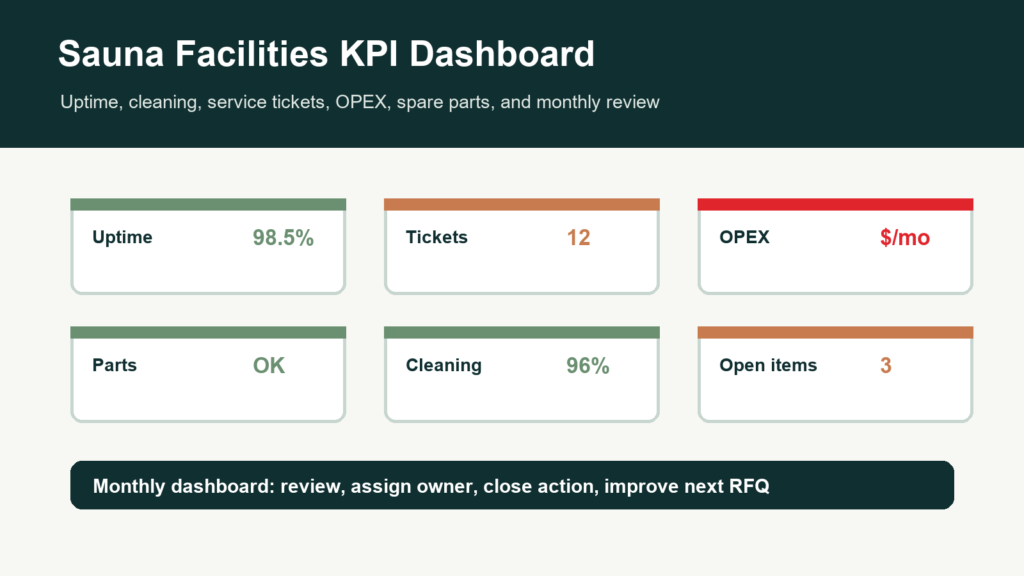
A commercial sauna becomes easier to manage when facilities teams track the same metrics every month. A facilities manager KPI dashboard turns cleaning, service tickets, downtime, energy assumptions, spare parts, and unresolved actions into a repeatable operating review.
We wrote this guide for hotels, gyms, spas, apartment properties, wellness clubs, developers, property managers, and distributors that need a practical sauna operating dashboard after handover. It connects CSauna procurement, commissioning, maintenance, service, and buyer file planning into one facilities-facing record.
Facilities KPI worksheet
Sauna KPI dashboard by model and use case
A useful facilities dashboard should separate display units, outdoor amenities, and commercial rooms. Each sauna model creates different uptime, cleaning, service, energy, and parts signals.
| Dashboard view | Model reference | KPIs to track | Decision trigger |
|---|---|---|---|
| Showroom demo health | CSA-01 Barrel Sauna | Demo uptime, customer trials, cleaning time, accessory replacements, dealer questions. | Update training or spare stock when the same issue appears in two monthly reviews. |
| Outdoor amenity performance | CSA-02 Cube Sauna | Door/glass service tickets, weather-related notes, guest-use frequency, heat-up complaints, exterior maintenance. | Escalate roof, seal, or glass hardware trends before seasonal demand peaks. |
| Commercial room uptime | CSA-05 Commercial Sauna | Room uptime, downtime hours, cleaning completion, heater faults, service tickets, guest complaints, parts used. | Start SLA, warranty, or refresh-budget review when downtime affects guest availability. |
| Rustic wood-fired operation | Wood-fired outdoor sauna | Local stove/chimney service notes, heat shield checks, floor wear, weather-exposed fasteners, safety incidents. | Separate factory product issues from local installation or chimney maintenance before claims. |
Connect KPI reviews with the monthly maintenance review, annual service review, and a KPI-focused buyer file review.
Core KPI Dashboard Fields
| KPI | What to Track | Why It Matters |
|---|---|---|
| Uptime | Open days, closed days, downtime hours, and reason for closure. | Shows whether the sauna is reliably available for guests, members, or residents. |
| Service tickets | Ticket count, severity, owner, evidence completeness, response path, and close date. | Reveals repeated issues and whether escalation is working. |
| Cleaning completion | Daily log completion, missed checks, housekeeping notes, and user-facing condition. | Protects experience, hygiene records, and warranty evidence. |
| Maintenance actions | Monthly checks, door fit, airflow, stones, controls, seals, benches, and open follow-ups. | Prevents small operating issues from becoming downtime. |
| Energy and OPEX | Operating hours, preheat cycles, local utility assumptions, and monthly cost notes. | Connects sauna use with the operating budget and future buyer file decisions. |
| Spare-parts status | Stock level, used parts, reordered parts, backorders, and model/SKU compatibility. | Stops low-cost parts from creating long service delays. |
| Open punch-list items | Unresolved handover issues, owner, evidence, and due date. | Keeps acceptance and facilities files from drifting after opening. |
Monthly Facilities Review Workflow
- Collect the records: cleaning log, service tickets, incident reports, maintenance notes, parts usage, and energy assumptions.
- Classify issues: product, installation, cleaning, user behavior, site condition, wear item, documentation, or training gap.
- Assign owners: facility team, housekeeping, dealer, distributor, contractor, local professional, or CSauna contact depending on scope.
- Close actions: record the evidence, date, owner, and whether the issue is closed, deferred, or escalated.
- Improve the buyer file: feed repeated issues into future model selection, spare-parts kits, manuals, service SLA, and purchase terms.
Dashboard Views by Buyer Type
| Buyer Type | Dashboard Priority | Useful Linked Guide |
|---|---|---|
| Hotel or spa | Guest complaints, cleaning completion, downtime, incident reports, and premium experience. | Commercial Saunas for Hotels and Spas |
| Fitness center | Peak-use recovery, door openings, member complaints, service SLA, and spare-parts readiness. | Fitness Chain Service SLA Guide |
| Apartment or condo | Resident rules, property manager ownership, HOA records, cleaning accountability, and service route. | Apartment and Condo Sauna Amenity Guide |
| Developer or contractor | Punch-list closure, handover file completion, and transition from construction to operations. | Commissioning Punch List |
| Distributor or dealer | Repeated tickets, parts use, warranty evidence, and customer-support scripts. | Service Ticket Template |
Dashboard Data Sources
A facilities dashboard should not be invented once a dispute appears. It should draw from records created during normal operation:
- Opening-day checklist and operator handover log.
- Daily or shift-based cleaning log.
- Monthly maintenance review and annual service review.
- Service ticket template and escalation matrix.
- Incident report template and warranty evidence checklist.
- Spare-parts minimum stock file and reorder forecast.
- Energy and OPEX worksheet.
- Commissioning punch list and final facilities file.
What to Add to the buyer file
Buyers can use dashboard planning before purchase. Add these fields to the buyer file:
- Who owns cleaning logs, service tickets, maintenance review, and incident reports after opening?
- What operating hours, user load, and opening schedule should the sauna be planned around?
- Which spare parts should be held locally, regionally, or by the distributor?
- What evidence should be collected for warranty, service, or downtime review?
- Which dashboard fields should be reviewed monthly by facilities or property management?
- Which repeated issues should trigger a change in model selection, packaging, manual, service SLA, or reorder plan?
How we support Dashboard Planning
We can help buyers define the supplier-side evidence that supports a facilities dashboard: model records, manuals, packing list, warranty evidence, spare-parts planning, service ticket fields, and buyer file assumptions. The buyer or property operator should own daily records, local labor, cleaning, and site-specific operational data.
Read this guide with the Monthly Maintenance Review Template, Annual Service Review Checklist, Energy and OPEX Guide, Commissioning Punch List, and contact page.
Sauna Facilities Manager KPI Dashboard FAQ
What should a sauna facilities manager track?
Track uptime, open service tickets, downtime hours, cleaning completion, incident reports, spare-parts stock, energy assumptions, monthly maintenance actions, and unresolved punch-list items.
Why does a sauna KPI dashboard matter?
A dashboard turns sauna operations into evidence. It helps facilities managers spot repeated issues, protect guest or resident experience, plan spare parts, improve cleaning, and feed real data into future RFQs.
How often should a commercial sauna dashboard be reviewed?
For most commercial projects, we recommend buyers review key metrics monthly, with a deeper quarterly or annual review for service trends, warranty evidence, parts planning, OPEX assumptions, and training gaps.
Can CSauna provide the buyer’s operating dashboard?
We can help define the data fields and supplier-side evidence, but the buyer, facility team, dealer, or property manager should own the actual operating dashboard and site records.
Facilities management appendix
Facilities KPI dashboard worksheet for sauna operations
A dashboard is useful only if the facility team knows what to measure, who owns the data, and how the metric changes decisions. This appendix turns sauna operations into a monthly review file.
Monthly sauna KPI table
| KPI | How to measure | Owner | Decision it should trigger |
|---|---|---|---|
| Availability | Open hours minus unplanned downtime, tracked by room or model. | Facility manager. | If availability drops, review service tickets, spare parts, and operating schedule. |
| Heat-up readiness | Time from preheat start to target operating condition during normal setup. | Opening staff or maintenance team. | If readiness misses target, check schedule, controls, room envelope, and heater assumptions. |
| Service ticket rate | Number of sauna-related tickets per month by category. | Service desk. | Repeated door, heater, cleaning, or user issues should create a corrective action. |
| Cleaning and inspection completion | Completed logs versus planned cleaning/inspection events. | Operations or housekeeping lead. | Missed checks require staff training or simpler handover tools. |
| Spare-part response time | Time from part request to approval or shipment. | Parts coordinator. | Slow response suggests stock level or compatibility record problem. |
Dashboard review meeting record
| Review item | Question to answer | Evidence to bring | Output |
|---|---|---|---|
| What changed this month? | Did downtime, complaints, heat-up time, or service tickets move? | Dashboard trend and ticket summary. | Top 3 operating risks. |
| Which issue repeats? | Is the same room, part, shift, or user behavior appearing again? | Ticket tags, photos, maintenance log, room schedule. | Corrective action owner. |
| What needs buyer or factory support? | Is the issue product evidence, operation, site condition, or spare-part planning? | Model code, photos, labels, temperature log, service history. | Clean support request or internal action. |
| What changes next month? | Should staff instruction, schedule, spare stock, or project file be updated? | Current handover file and open action list. | Updated dashboard note and deadline. |
How the project team should use this appendix
- Keep KPI definitions simple enough that front desk, cleaning, and maintenance teams can use them.
- Do not combine all sauna rooms into one metric when one model or room is creating most issues.
- Use model codes and product links inside KPI records so support conversations stay concrete.
KPI operating appendix
KPI threshold examples for sauna facility managers
A KPI dashboard should tell the facility team when to keep watching, when to investigate, and when to change the operating plan. These thresholds give buyers a practical way to turn sauna data into action.
KPI threshold examples
| KPI | Normal watch | Investigate | Act now |
|---|---|---|---|
| Availability | Planned closures only and no repeat downtime. | Two short unplanned closures in a month. | Peak-hour closure, guest/member impact, or repeated same-room outage. |
| Heat-up readiness | Room ready within the planned opening routine. | Occasional miss with known staff or cleaning cause. | Repeated miss without clear cause or after operating routine is corrected. |
| Service ticket rate | Isolated ticket with clear resolution. | Same category appears twice in a review period. | Repeated door, heater, controller, or glass concern across rooms/sites. |
| Cleaning/inspection completion | Logs complete and staff notes are consistent. | Missed entries or unclear signoff. | Condition complaint or safety concern appears with missing logs. |
Monthly review output table
| Output | What it should contain | Owner | Follow-up |
|---|---|---|---|
| Top operating risk | One issue that most affects availability, perception, or service cost. | Facility manager. | Assign action and review at next meeting. |
| Evidence gap | Missing photo, label, log, ticket tag, or model code that slowed review. | Service administrator. | Update ticket or dashboard field. |
| Product/service learning | Repeated part, manual, cleaning, or training issue. | Dealer or supplier contact. | Feed into spare stock, manual, or training update. |
| Budget signal | Condition, downtime, or repair pattern that should move into budget planning. | Owner/operator. | Add to lifecycle budget or replacement review. |
How buyers should use this planning file
- A dashboard is useful only when it creates a decision, not when it simply lists data.
- Review KPI records by room/model before combining everything into one property-wide number.
- Use the monthly review to improve service ticket fields, spare stock, and buyer handover files.