
FCL Loading
Build the container file around model codes
A sauna container loading file should show more than how many rooms fit. It should connect model mix, carton sequence, accessory cartons, spare parts, labels, documents, and unloading needs.
Container loading file for sauna shipments
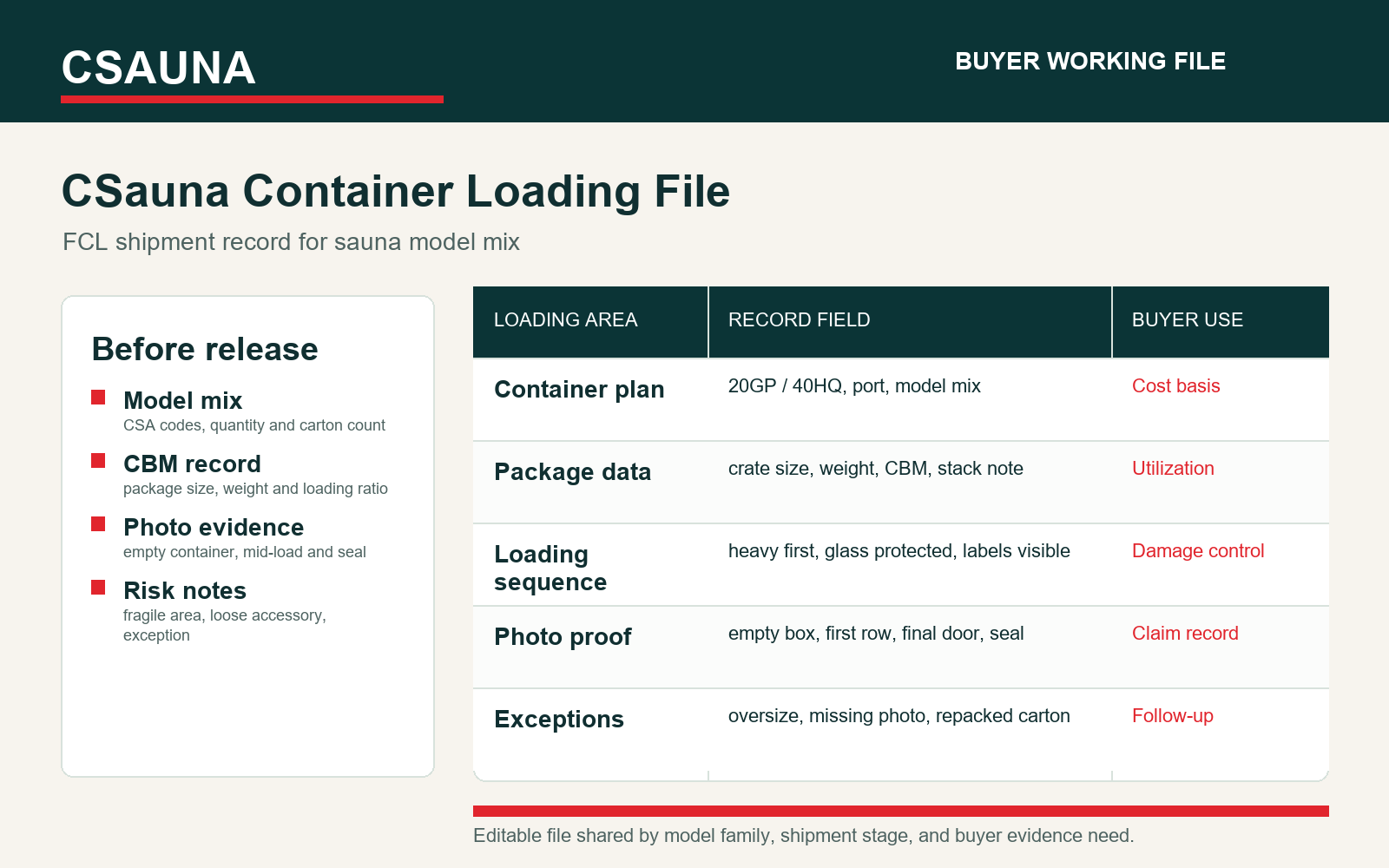
Large sauna products need a loading record that buyers, brokers, and warehouses can read later. The preview keeps model mix, CBM, carton marks, photo proof, and exceptions in one working file.
- Model mixCSA codes, quantity and carton count
- CBM recordpackage size, weight and loading ratio
- Photo evidenceempty container, mid-load and seal
- Risk notesfragile area, loose accessory, exception
No quote request is required for this checklist. Buyers can use the article directly, or ask for the editable file when model family, shipment stage, or inspection evidence needs to be aligned.
Load by handoff, not only by volume.
Sauna rooms can include long panels, glass, heater cartons, roof materials, accessory boxes, and spare-parts kits. If the loading file is unclear, the buyer may receive the right goods but still struggle to identify cartons at the warehouse or jobsite.
Use this guide when planning full-container orders, mixed model shipments, dealer starter orders, and project shipments with multiple sauna families.
1. Container planning fields
Before loading, the buyer and factory should agree on the fields that make the shipment traceable.
| Field | What to record | Why it matters | Owner |
|---|---|---|---|
| Model code | Every room model and quantity | Connects cartons to product pages | Sales and warehouse |
| Carton count | Total cartons per model and accessory group | Supports receiving check | Warehouse |
| CBM and weight | Packing volume and approximate gross weight | Supports freight planning | Logistics |
| Glass cartons | Separated and marked where needed | Protects fragile handling | Warehouse |
| Heater cartons | Voltage, power, control package | Avoids market mismatch | Factory and buyer |
| Spare parts | Starter kit or project-specific parts | Supports after-sales | Dealer or importer |
2. Mixed container structure
Mixed containers need stronger labels because several models may look similar after packing.
| Group | Recommended label | Receiving check | Risk |
|---|---|---|---|
| Standard rooms | Model code plus carton sequence | Count all cartons before unpacking | Missing carton not noticed |
| Custom rooms | Project name plus room number | Keep project cartons together | Parts mixed with standard rooms |
| Glass | Fragile and model code | Check condition before moving | Damage evidence lost |
| Heater and controls | Voltage and model reference | Match to room before installation | Wrong market package |
| Accessories | Accessory carton and included list | Open after room count | Small items misplaced |
| Spare parts | Service kit and model family | Store separately | Used before recorded |
3. Pre-loading photo checklist
Photos are the easiest way to prove what was loaded and how it was arranged.
| Photo | What it should show | Why it matters | File name suggestion |
|---|---|---|---|
| Carton labels | Clear model and sequence labels | Supports receiving and claims | model-carton-label |
| Glass protection | Fragile cartons and placement | Protects damage review | glass-loading |
| Heater cartons | Heater labels and voltage note | Prevents electrical mismatch | heater-package |
| Accessory cartons | Carton mark and included list | Avoids missing-item disputes | accessory-carton |
| Container start | Empty or prepared container | Shows loading condition | container-before |
| Final load | Last row and seal view | Confirms loading and seal | container-final |
4. Receiving and unloading checks
The buyer should know how to receive the container before it arrives.
| Receiving step | What to check | Evidence | Action if abnormal |
|---|---|---|---|
| Seal and exterior | Seal number and container condition | Photo before opening | Record before unloading |
| First cartons | Labels match packing list | Opening photo | Pause if mismatch |
| Fragile cartons | Glass and visible damage | Close-up photos | Record before moving |
| Count by model | Carton count and sequence | Receiving checklist | Report missing sequence |
| Accessory carton | Manuals, labels, spare parts, small hardware | Accessory photo | Separate storage |
| Jobsite allocation | Move project cartons together | Site receiving note | Avoid mixing projects |
Container loading responsibility and evidence sheet
A loading plan is useful only when each carton group has an owner, photo proof, and receiving action. The buyer should be able to open the file at the warehouse and know which cartons belong to each model, which cartons are fragile, and which cartons must be checked before dealer allocation.
| Loading item | Required record | Evidence file | Owner before loading | Owner after arrival |
|---|---|---|---|---|
| Model group | CSA model code, product URL, quantity, carton sequence, and buyer order line. | Model group photo and carton-label close-up. | Factory warehouse | Buyer warehouse receiver |
| Glass and fragile cartons | Glass type, carton mark, standing direction, edge protection, and placement inside the container. | Fragile-label photo, glass carton side photo, final load position photo. | Factory packing owner | Receiving QC owner |
| Heater and controller cartons | Voltage, kW, phase, controller type, model family, accessory bag, and destination market. | Heater label photo and carton mark photo. | Factory technical packing owner | Installer or dealer service owner |
| Accessory and spare-part cartons | Hardware bags, manuals, labels, stones, lighting, remote, gasket, handle, hinge, and spare-part kit list. | Accessory layout photo and carton content list. | Accessory packing owner | Dealer parts coordinator |
| Container condition | Container number, seal number, floor condition, moisture check, odor check, wall condition, and loading start time. | Empty-container photo, floor photo, seal photo, final-door photo. | Loading supervisor | Freight claim owner if abnormal |
| Mixed-order separation | Which cartons are for showroom, distributor stock, hotel project, replacement parts, or private-label order. | Color label or pallet-zone photo. | Sales handoff and warehouse | Buyer warehouse and project manager |
Container receiving discrepancy log
If the warehouse finds a mismatch, record it before cartons are moved into separate areas. This keeps container evidence usable for freight claims, supplier follow-up, and the next container plan.
| Discrepancy | What to check first | Evidence required | Closeout condition |
|---|---|---|---|
| Missing carton sequence | Compare packing list, carton label, and unloading count before unpacking other groups. | Photo of visible carton sequence, receiving count sheet, and packing list line. | Supplier confirms whether the carton was omitted, mislabeled, or loaded under another group. |
| Damaged glass carton | Check exterior impact point, carton orientation, and whether glass was moved after arrival. | Photo before movement, close-up of impact, label photo, and unloading video if available. | Freight or supplier route is assigned with replacement or inspection decision. |
| Wrong heater market package | Check voltage, kW, phase, plug/control package, and destination order file. | Heater label, controller label, carton mark, order note, and model code. | Factory confirms replacement, adapter route, or stop-use instruction before installation. |
| Accessory shortage | Open accessory carton in a controlled area and compare against the included list. | Accessory layout photo, missing item list, carton label, and model reference. | Replacement, credit, or next-shipment inclusion is written into the buyer file. |
| Project cartons mixed | Separate cartons by model code, room number, hotel/project zone, or private-label carton mark. | Warehouse sorting photo and corrected allocation list. | Project manager signs off before cartons are sent to site. |
How buyers should use this document
This resource should become a working file, not a one-time article. Importers can use it to compare supplier readiness, distributors can use it to train dealers, and commercial buyers can use it to align procurement, warehouse, installation, and service teams.
| Buyer role | Use it for | Fields to keep visible | Next action |
|---|---|---|---|
| Importer | Supplier comparison and order control | Model, material, voltage, documents, packing, service owner | Attach to buying file |
| Distributor | Repeatable dealer program and stock planning | SKU, installed base, spare parts, training owner | Turn into internal checklist |
| Dealer | Customer handover and installation support | Product page, drawing, accessories, warranty, photos | Use on every handover |
| Commercial buyer | Hotel, gym, spa, or amenity project coordination | Approved drawing, operator, maintenance owner | Attach to project folder |
| Warehouse team | Packing, carton labels, receiving, and part control | Carton count, accessory carton, spare kit, labels | Check before shipment |
| Service team | Future questions and replacement decisions | Issue photo, model code, part group, action history | Update case record |
Evidence to keep with the file
Evidence makes the difference between a useful B2B resource and a generic article. Keep the approved facts together so the answer to a future question comes from the record, not from memory.
| Evidence item | What it proves | Who uses it | When to update |
|---|---|---|---|
| Model page | The product family and visual reference selected by the buyer | Buyer, dealer, factory sales | When the model changes |
| Approved drawing | Size, door, glass, bench, heater, ventilation, and accessory positions | Design, installer, buyer | Whenever layout changes |
| Material record | Wood, roof, exterior finish, hardware tone, certificate needs | Buyer and design team | Before cutting visible material |
| Electrical note | Voltage, phase, heater power, controller, and market standard | Importer and electrician | Before heater package is locked |
| Packing file | Carton sequence, accessory carton, spare parts, labels, manuals | Warehouse and buyer | Before shipment |
| Photo record | What was packed, received, installed, or serviced | Dealer, service team, operator | At every handover or claim |
Review cadence after the first order
The first order should improve the next order. Review what caused extra messages, missing details, or service questions, then update the working file before repeating the model.
| Timing | What to review | Evidence to check | Decision |
|---|---|---|---|
| Before production | Model, size, wood, heater, document needs | Approved drawing and option sheet | Lock or revise |
| Before shipment | Cartons, labels, manuals, accessories, spare kit | Packing photos and list | Approve shipment |
| After arrival | Damage, missing items, label clarity | Receiving photos and notes | Separate logistics issues |
| After installation | Site fit, function, installer questions | Installed photos and test notes | Update installation guide |
| After first month | Service questions and user feedback | Issue log and maintenance notes | Update support file |
| Before reorder | Slow movers, repeated issues, weak fields | Sales, warehouse, and warranty records | Revise next order |
Good loading habits
- Label by model
- Separate glass and heater cartons
- Photo before and after loading
- Attach packing list
- Plan receiving sequence
Loading risks
- No carton sequence
- Mixed model labels
- No glass photo
- No spare-parts carton mark
- No receiving checklist
Model references used in this guide
Use current model pages when planning packing or loading, for example CSA-01 red cedar barrel sauna, CSA-02 outdoor cube cedar sauna, and CSA-10 backyard sauna cabin.
Factory note
For repeat container buyers, loading evidence becomes part of the supplier quality file. A clear loading file reduces receiving disputes and helps the next mixed-container order become easier.
Working note for repeat orders
The first version of this file should be treated as a working draft for the buyer team. After the first order, the importer or distributor should review what actually happened: which fields were clear, which cartons or parts created extra questions, which staff needed more instruction, and which model details had to be checked again with the factory. That review turns a generic checklist into a stronger operating file.
For repeat orders, keep the same structure but update the details. The model mix may change, the destination market may require a different voltage or document note, and a dealer may add private-label manuals, labels, or spare parts. A stable file format helps the factory respond faster because each new order uses the same language for model, material, heater, packing, service, and handover decisions.
The buyer file should also name what is not yet confirmed. If the heater voltage, carton mark, accessory list, certificate request, or spare-parts scope is still open, write that clearly instead of leaving the field blank. Open fields are easier to manage than hidden assumptions, especially when several people are involved in purchasing, production, shipping, installation, and after-sales support.
Need an editable container loading checklist?
Send the model mix, destination, and order type. We can prepare an editable loading and receiving checklist for your container file.