A dealer maintenance record should make a service case easier to understand, not turn it into a long email chain. This guide is for distributors, showroom teams, hotel and spa operators, and private-label service teams. It sets out what to record when a sauna is reported as not heating, showing a controller issue, tripping a breaker, developing a door or glass problem, or arriving with a missing part.
Start with safety, the exact model, and visible evidence
Start every case with the model reference, site, installation date, symptom in the user’s own words, and date first reported. Then collect only the evidence relevant to the symptom. A clear service file helps the dealer decide whether the next step is normal operation guidance, an installer visit, a qualified electrician, a replacement-part review, or factory technical review.
Do not diagnose electrical faults or repeatedly reset a tripped breaker. Stop use and arrange qualified site review where there is smoke, a burning-plastic smell, repeated breaker trips, exposed wiring, water near electrical parts, cracked glass, a loose bench structure, controller overheating, or another condition that could create a safety risk. Record the stop-use decision, time, responsible person, and photos before the room is reopened.
First response: what to check and what to collect
| Reported issue | First checks | Evidence to collect | Next owner |
|---|---|---|---|
| Room heats slowly | Set temperature, preheat time, door and ventilation use, heater label, stone loading, ambient conditions. | Controller screenshot, heater label, room overview, temperature record at regular intervals, door-seal photo. | Dealer and site operator; qualified installer or electrician if the electrical route needs review. |
| Controller error or blank screen | Visible moisture, display damage, recent cleaning, accessible connector condition, time when the error appears. | Clear error screen, controller model, heater label, room overview, short startup video where safe. | Dealer records evidence; factory technical review or qualified site professional as appropriate. |
| Breaker trips or power loss | Do not keep resetting. Note timing, visible water exposure, circuit label, and heater label. | Breaker and heater labels, date/time of trip, wiring-area photo only if safe, electrician note. | Qualified electrician; dealer records the result before any factory review. |
| Door, glass, or hardware issue | Check for crack, hinge movement, base level, frame pressure, transport damage, and installation timing. | Full door view, hinge/handle close-up, gap photo, short open-close video, packing label if available. | Dealer or installer. Stop use if glass is cracked or the structure appears unsafe. |
| Missing or wrong part | Compare the model, packing record, part list, and customer description before naming a replacement. | Model code, carton mark, packing list, part photo, quantity, and location where the issue was found. | Dealer service coordinator and factory parts review. |
Keep one case record from first report to closeout
A spreadsheet, ticket system, or shared service record can work. What matters is that everyone reads the same version. Keep the product identity, operating context, evidence, action taken, and decision owner together. A public catalog reference may identify the starting model, but any custom drawing, heater choice, voltage, door direction, or packing change should also be recorded.
| Field | What to record | Why it matters |
|---|---|---|
| Case header | Case number, dealer, customer site, model code, product URL, order reference, installation date, and first-report date. | Matches the issue to the correct model, order, manual, packing record, and parts route. |
| Operating condition | Set temperature, actual temperature, runtime, room use, ventilation, door position, ambient condition, and actions already tried. | Separates an operating or environmental question from an equipment or installation issue. |
| Evidence status | Attached photos, controller screenshots, labels, short videos, installer notes, and missing items. | Shows whether a case is ready for technical or parts review without repeated requests. |
| Decision and owner | Monitor, schedule service, stop use, electrician required, factory review, replacement review, due date, and responsible person. | Prevents cases from moving between dealer, installer, buyer, and factory without a clear next step. |
| Closeout | Finding, action, parts used, customer confirmation, files retained, and a prevention note for future orders. | Turns a resolved case into usable service and product-feedback evidence. |
Ask for useful photos and screenshots
Photos are evidence, not decoration. Ask for a clear controller screen rather than a written error code alone; a heater label rather than an exterior product photo; a full room view as well as a close-up; and a carton mark or packing-list reference for a missing part. Short videos are useful for a door movement, intermittent controller behavior, unusual sound, or a startup sequence. Ask the customer to state the model and the issue before recording a video.
Classify before sending a warranty request
Not every service question is a warranty question. Begin with a provisional category: operation and user expectation; installation or site condition; electrical or local-safety review; part identification or compatibility; shipping and handling; or potential product-quality issue. The category can change when evidence arrives. This avoids promising a part or responsibility before the room, installation, electrical route, and order scope are known.
Maintenance frequency should match the use level
| Environment | Routine checks | Periodic review |
|---|---|---|
| Hotel, gym, spa, or resort | After use: surface condition, obvious damage, controller status, heater area, and customer notices. | Weekly service-log review; monthly inspection of door, glass, ventilation, stones, fasteners, and reported performance; seasonal electrical and site review by responsible professionals. |
| Dealer showroom or demo unit | Keep the display clean, identify the model clearly, and check visible wear and customer touch points. | Run and record demonstration checks, compare the display against current product records, and review common questions and parts needs each month. |
| Outdoor residential installation | Ventilate after use, keep the heater area clear, and check visible door, roof, drainage, and exterior conditions. | Review base level, roof, drainage, exterior condition, ventilation, and electrical protection before severe weather or seasonal changes. |
| Distributor stock and sample fleet | Protect carton marks and accessory bags; do not mix parts without a record. | Review package condition, model tags, open tickets, spare-parts use, and repeated model-family issues before the next order. |
Use service records to improve the next order
Review recurring cases by model family and order context. A pattern may reveal that a buyer needs clearer installation instructions, a different heater or voltage discussion, stronger packing protection, a better spare-parts label, a showroom handover note, or earlier review of site conditions. Record the pattern without assuming that one case proves a universal manufacturing fault.
What to send for a factory-side review
For the selected model and service case, CSauna can review factual product, packing, and available document records when the dealer supplies the model reference, site context, symptom timeline, evidence pack, actions already taken, and the requested decision. We can help identify what information is still missing and whether the next route is factory technical review, a parts check, an installer discussion, or qualified local electrical review. Final safety, installation, electrical, and local-compliance decisions remain with the responsible local parties.
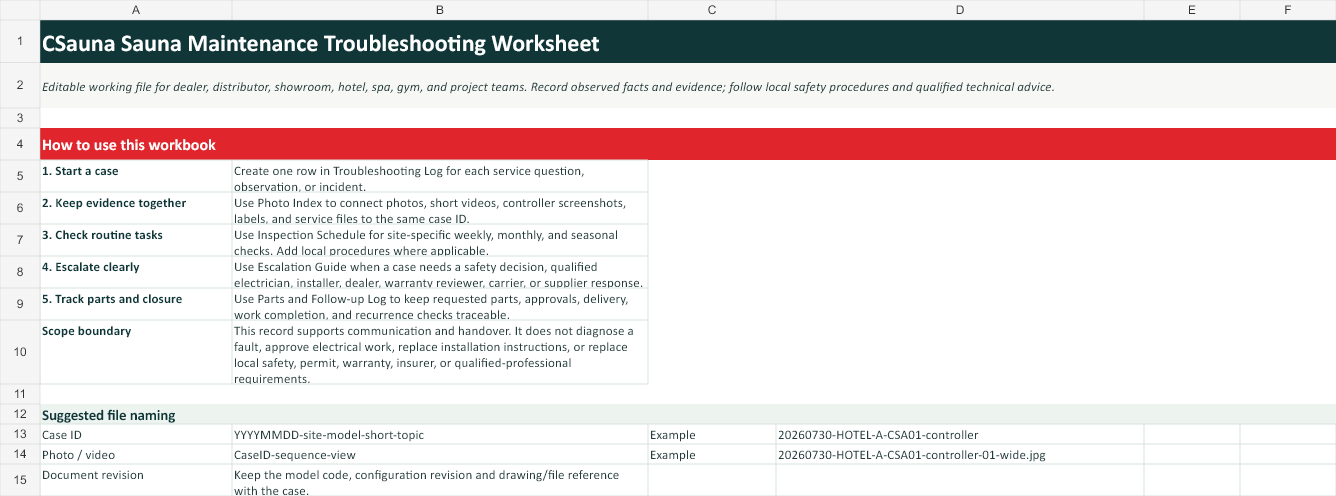
Download the editable troubleshooting worksheet
Use this editable working file to keep a maintenance question, visible observation, evidence set, assigned owner, part request, and follow-up action in the same case record. It is intended for dealers, distributors, showrooms, hotels, spas, gyms, and project teams.
- Troubleshooting Log for case details, observations, evidence, ownership, status, and closure.
- Inspection Schedule for site-specific daily, weekly, monthly, and seasonal planning.
- Photo and Evidence Index to keep photos, controller screenshots, labels, and documents connected to the correct model or order.
- Escalation Guide and Parts and Follow-up Log for clear handover and documented review.
Download the CSauna Sauna Maintenance Troubleshooting Worksheet (XLSX)
Scope note: this worksheet supports factual record keeping and communication. It does not diagnose faults, approve electrical or installation work, replace model-specific instructions, or replace local safety procedures and qualified professional advice.